PowerPoint soft skills

PowerPoint soft skills headshot

Do you have expert PowerPoint soft skills?  Are you an expert presenter?  I’ll bet there’s at least one item here you might not know.  Fortunate to have spent some time learning from Asia Platt, Brittany Holloway, and Mauricio Fuentes about expert presentations.  Let’s go over some tips and tools to improve what you present, for more interaction, clarity, and more.


Quick Overview

Magnification tools like Magnifier, ZoomIt, and Teams

Laser pointer in PowerPoint

Rehearse and record PPT slide deck

Soft Skills tips and tricks


Magnification tools

Zoom – Can you see this?

Various methods for Zooming (including Teams)

Zoom - Can you see this?
Zoom – Can you see this?


Do you struggle with demo’s to present screens that customers struggle to view?  See some magnifier tool options from windows client/server, teams, and PowerPoint below.

Magnifier (on Windows client/servers)

Click on Start > type Magnifier

Windows Magnifier to zoom in on live demo's.


Change zoom level

Move mouse to focal point

Move to focal for zoom.


BE careful and don’t move mouse too much!!


ZoomIt

Good utility for demo’s and presentations.  Zoom, draw, whiteboard, type pen (in colors), and more

ZoomIt SysInternals free tool download https://learn.microsoft.com/en-us/sysinternals/downloads/zoomit

Shortcuts link

ZoomIt SysInternals Shortcuts.

Teams built in Zoom

My own personal preference is Teams.  Demo’s can work in a pinch if only Magnifier is involved in a lab demo.

Zoom in/out of Teams shared application/screen https://support.microsoft.com/en-us/office/zoom-in-and-out-in-microsoft-teams-dc3cd3d8-efb5-4995-8b31-434b3943ba52

Use Teams features to zoom in and out, and more in meetings, calls, and screen shares.


Laser pointer in PowerPoint

Hit the Control Key to turn your mouse into a pointer, allowing your audience to know ‘what’ is being emphasized.

Click Control, or Control-L for Laser pointer when presenting in PowerPoint.

Click Control, or Control-L for Laser pointer when presenting in PowerPoint.


Rehearse with coach

Record PPT slide deck

Asia (Asha) suggested this method to record delivery for analysis.  This helps check tone, pace, filler words, and more.


From PowerPoint, click on Slide Show > Rehearse with coach

PowerPoint Rehearse - record and get analysis from practicing your presentation.

PowerPoint Rehearse – record and get analysis from practicing your presentation.Go through presentation, and view analysis

PowerPoint rehearsal analytics showing pace, tone, and more.

Second page screenshot of more details

PowerPoint rehearsal analytics bottom half of screen.


Soft Skills tips and tricks

  1. PowerPoints ‘Rehearse with Coach’ is an awesome way to practice and level set delivery.
  2. Magnification tools – Magnifier, ZoomIt, Teams (built in Zoom)
  3. Be creative and be yourself in delivery!
Be creative and be yourself in delivery.

3. Involvement

Soft Skill Involvement
Involvement example

Interaction soft skill – personalization.

I utilized this to reinforce (from my introduction), as an audience check in, gauging involvement.  This helped me gauge where the audience was attention wise.  Required audience thought before answering.

Interaction soft skill - personalization.  Where from my introduction, I used this to quiz the class to gauge interest and where the audience was attention wise.  Audience had to think about the slide to answer.
Interaction soft skill – personalization. Where from my introduction, I used this to quiz the class to gauge interest and where the audience was attention wise. Audience had to think about the slide to answer.


Hope this article provided another tool in the Presentation Soft Skills toolbox!

Hope this gave another tool in the Presentation Soft Skills toolbox!

Hope this gave another tool in the Presentation Soft Skills toolbox!

Delete PKI certificates

Don't you wish this were the certificates we worked with!
Don’t you wish this were the certificates we worked with!


Man, I wish I had a few of these certificates in my PKI infrastructure (portfolio)!  Ever need to identify an expired certificate, and or delete the certificate?  Depending on UAC, AppLocker, and other settings, the delete portion may require server logon.


Identify an expired certificate

Few ways to identify an expired certificate on servers.

Via RDP session to server

RDP to server, open MMC > Add Plug In > Certificates > for Computer

RDP to server, MMC, Certificates Plug In, Computer, expand certificate store to find expired certificate.


Via PowerShell

GCI Cert:\LocalMachine\*

The certificate store file path will vary the above command.

NOTE the SuperUser blog post will help decipher the folder name


Via ‘smart’ PowerShell across multiple machines

Courtesy of Vance Cozier!

“server1”,”server2″| % {invoke-command $_ -scriptblock {$env:ComputerName; GCI Cert:\LocalMachine\* }}


Via Monitoring for expired certificates

Using SCOM Certificate Monitoring or PKI monitoring management packs

Identify Expired certificates

Console navigation steps:

From SCOM console > Monitoring Tab

Expand PKI folder > Expand Certificates and CRLs folder

Click on ‘Certificates – Expired’ state view

SCOM Expired PKI certificates state view.


Did you know

Run PowerShell commands from Holman’s SCOM Management pack (blog)- github download

Run PowerShell from Monitoring tool

From SCOM console > Monitoring Tab > SCOM Management folder > SCOM Agents

Highlight agent(s)

From Tasks Pane > click on ‘Execute any PowerShell’ task

SCOM Management pack, SCOM Agents, highlight agent(s), click on Task Pane > Execute any PowerShell task.

On the pop-up window, click Override

Adjust timeout to 70 (seconds)

Override command line

Run the following commands (various Certificate store examples provided for removing expired certificates)

Personal Certificates folder

Get-ChildItem Cert:\LocalMachine\My | ? { (( $_.Subject -like “*GlobalSign*” ) -OR ( $_.Issuer -like “*GlobalSign*” )) -and $_.NotAfter -lt (get-date) } | fl Subject,Issuer

Trusted Root folder

Get-ChildItem Cert:\LocalMachine\Root | ? { ( $_.Subject -like “*GlobalSign*” ) -OR ( $_.Issuer -like “*GlobalSign*” ) } | fl  Subject,Issuer

Third Party Root

Get-ChildItem Cert:\LocalMachine\AuthRoot | ? { (( $_.Subject -like “*GlobalSign*” ) -OR ( $_.Issuer -like “*GlobalSign*” )) -and $_.NotAfter -lt (get-date) } | fl Subject,Issuer

Run PowerShell task.

Click OK button to close Overrides window

Click OK to run task

View task output

PS C:\Users\admin> Get-ChildItem Cert:\LocalMachine\Root | ? { ( $_.Subject -like “*GlobalSign*” ) -OR ( $_.Issuer

like “*GlobalSign*” ) } | fl Subject,Issuer


Subject : CN=GlobalSign Root CA, OU=Root CA, O=GlobalSign nv-sa, C=BE

Issuer  : CN=GlobalSign Root CA, OU=Root CA, O=GlobalSign nv-sa, C=BE

Subject : CN=GlobalSign, O=GlobalSign, OU=GlobalSign Root CA – R2

Issuer  : CN=GlobalSign, O=GlobalSign, OU=GlobalSign Root CA – R2


Once task completes, go back to the Certificates state view > highlight the certificate > Click the Rediscover Certificates task

SCOM PKI Certificate state view


Delete PKI certificates

After identifying correct certificate and folder in question that requires deletion:

    1. Verify backup of certificate
    2. Test delete via PowerShell window from SCOM

Get-ChildItem Cert:\LocalMachine\AuthRoot | ? { ( $_.Subject -like “*GlobalSign*” ) -OR ( $_.Isser -like “*GlobalSign*” ) } | Remove-Item -DeleteKey

  1. Verify Task output shows certificate deleted
  2. Refresh MMC GUI > Certificates plug in, and folder to verify certificate deleted
  3. Go back to SCOM Console Monitoring Tab
  4. Expand PKI folder
  5. Expand Certificates and CRLs folder
  6. Click on Certificates – Expired state view
  7. In Tasks pane on right, click on Rediscover certificates task, Click OK to run
  8. Open Health Explorer and reset monitor to clear alert

Alternatively, leverage PowerShell reset logic on SCOM MS, use blog


Documentation

SCOM Certificate monitoring TechCommunity blog https://techcommunity.microsoft.com/t5/system-center-blog/scom-management-pack-for-certificate-monitoring/ba-p/3619299

Download SCOM Certificate monitoring pack https://www.microsoft.com/en-us/download/details.aspx?id=104858

Long-standing PKI certificate pack and blog https://blog.topqore.com/new-version-pki-certificates-monitoring-pack-for-scom/

Identify certificate stores to windows folders https://superuser.com/questions/217719/what-are-the-windows-system-certificate-stores

STIG finding V-69223 https://www.stigviewer.com/stig/zos_tss/2016-06-30/finding/V-69223

Updated DNS2012R2 Addendum

DNS2012R2 addendum pack updated!

Updated DNS2012R2 Addendum overrides.  Learned a few new things with Overrides workspace views, and why Authoring pane > Management pack Objects > Overrides may not load.


When your management pack has improper overrides, expect the loading icon.  This may be caused due to overrides, whether error is with target, class/rule/monitor.

Console Overrides Loading


Sometimes, an Object of class error gets your hopes up (pointing at a non-existent object).

Object of Class error


Example when Overrides loads properly

When Authoring Tab Overrides view loads successfully.


If Overrides view will not load, try creating a workspace view for Overrides.

Navigation Steps:

From SCOM Console

Click on My Workspace

Right Click  > New > Overrides Summary View

Create Workspace Overrides View


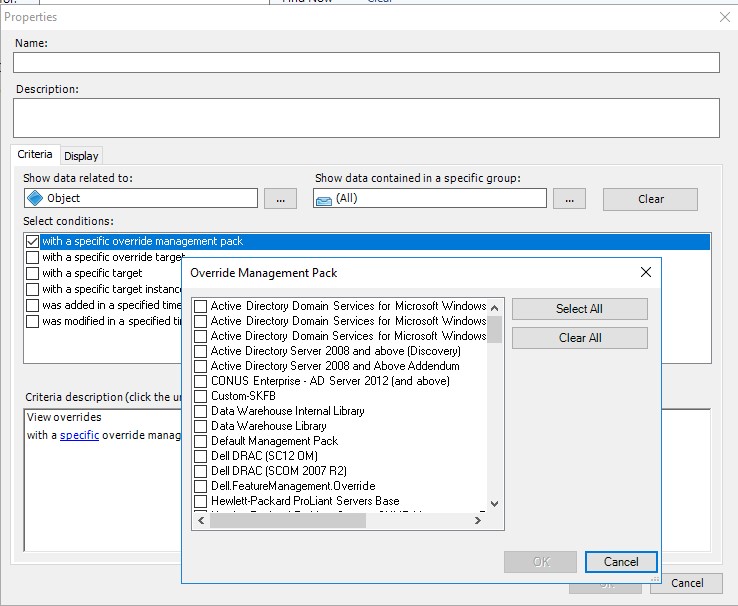
Select checkbox ‘with a specific override management pack’ checkbox, then the ‘specific’ link to choose management pack(s).

Select Specific Override management pack(s)


Choose unsealed management pack(s) with overrides

Can select all – OR pick a few to see what loads without errors

Click OK

If you get the loading screen and error, now begins the pack analysis.

OverridesViewFailsToLoad

Clicking on the ‘Show’ link points to a non-existent object

Microsoft.EnterpriseManagement.Common.ObjectNotFoundException: An object of class ManagementPackClass with ID 76e2559c-aaf4-b1ec-60cf-d40ab4102fbc was not found.


How did I know that?

Run get-SCOMClassInstance command from PowerShell or Operations Manager shell

Example output of ‘get-SCOMClassInstance -ID “76e2559c-aaf4-b1ec-60cf-d40ab4102fbc” ‘

Get-SCOMClassInstance output of the GUID listed in the console error.


Work on the Overrides of the affected XML packs, and Import.

Once corrected, the Workspace view loads successfully, finite!

Overrides Workspace view of addendum packs


Documentation

My Workspace https://learn.microsoft.com/en-us/system-center/scom/manage-web-console-my-workspace?view=sc-om-2022

Monitoring workspace https://learn.microsoft.com/en-us/system-center/scom/manage-using-monitoring-workspace?view=sc-om-2022

NiCE VMware addendum

'NiCE VMware addendum' enhances VMware monitoring, tuning alerts to 'manual intervention' required alerting. 
‘NiCE VMware addendum’ enhances VMware monitoring, tuning alerts to ‘manual intervention’ required alerting.

‘NiCE VMware addendum’ enhances VMware monitoring, tuning alerts to ‘manual intervention’ required alerting. The NiCE folks have been around for some time as a trusted Microsoft partner, creating additional monitoring functionality across Microsoft products.  Having completed a number of projects implementing the VMware pack, it’s time to share the configuration and alert report capabilities.


Quick Download HTTPS://GITHUB.COM/THEKEVINJUSTIN/NICEVMWAREADDENDUM/

Changes to Nice vmware pack

Key breakdown of VMware ESX environment monitoring

NiCE VMware monitoring features for ESX, vSphere, vSAN environments


Adjustments to vendor pack to further the mantra ‘alert when manual intervention required’.

Set monitor alerts to multiple samples over an hour (i.e. compute and performance of ESX environment)

Reports by team (requires regular expression updates for environment servers owned by each team)

Monitor reset logic, and service monitorType (count logic for X failures over Y time, before alert)

Overrides to change vendor pack provided discoveries, rules, monitors

Remove alert noise for unmanaged objects in ESX environment


Customize pack for environment

Customize the ‘NiCE VMware addendum’ pack for specific environment. This means updating group discoveries, and GUIDs for group specific overrides.  Further updates are required to update server naming conventions for team virtualization reports.

Classes/groups created for pack

VMware classes included for additional customization.

Discoveries

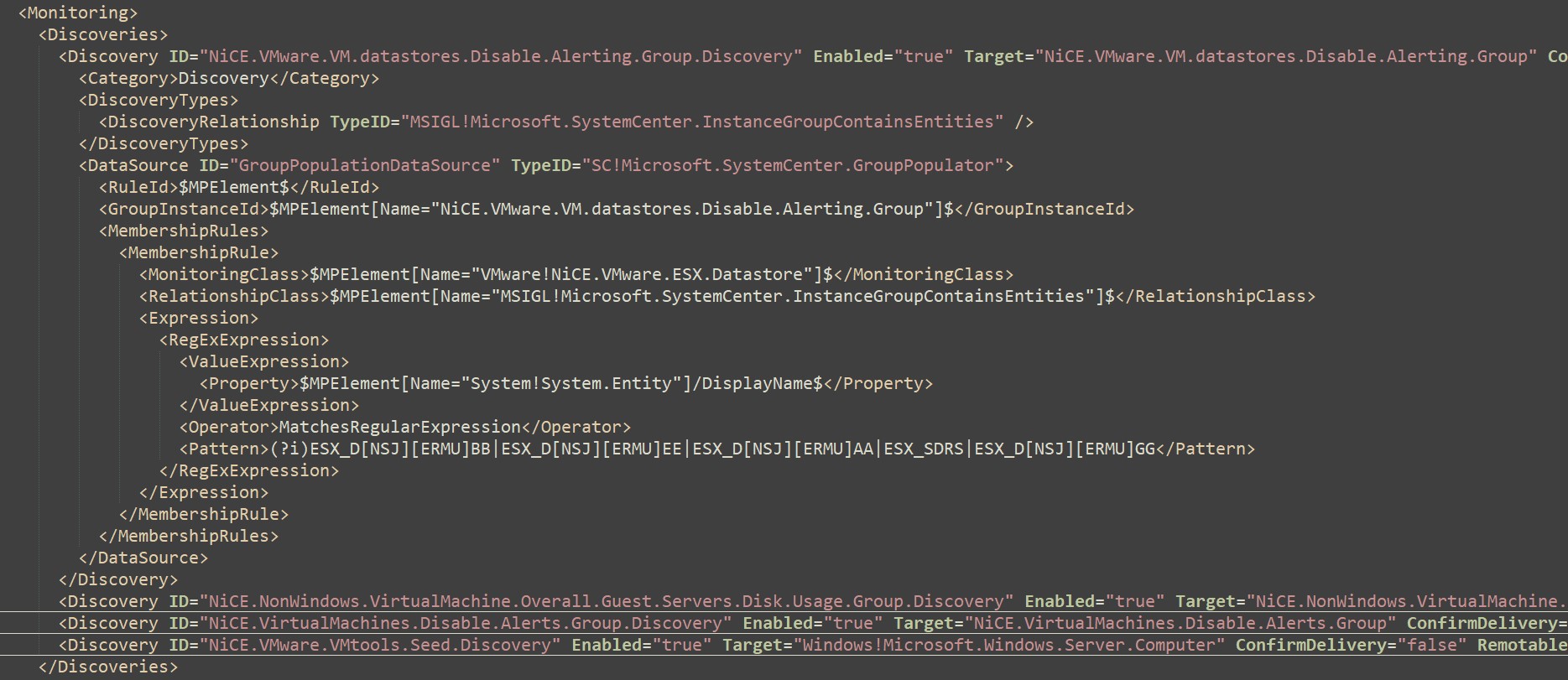
Breakout of Discoveries that need pattern updates to match

Find/Replace ##ESXHostDataStoreNamingConventions## with names to exclude

Example of regular expressions for multiple customers

VMware Group Seed Classes defined in the addendum.


Update disable guest machine alerts

Disable guest machines in ESX environment to disable alerts.

Find ##ESXGuestServersDiskUsageNamingConventions##

Replace with relevant guest naming conventions


Example template/guest/virtual machine names typically disabled

Update discovery to disable alerts on object names of virtual machines in ESX environment.


Service MonitorType

Service MonitorType adds Samples and Intervals to alert after consecutive failures (x failures in y minutes then alert )

VMware service MonitorType defined in the addendum.

Rules, Monitors, Recoveries

List of workflows used to troubleshoot/resolve problems

VMware addendum rules, VMTools monitor, and recovery components included.


Documentation

NiCE VMware management pack https://www.nice.de/nice-vmware-mp/


File Services Addendum

File Services is all about sharing.

‘File Services Addendum’, named Microsoft Windows Server FileServices 2016 Addendum, adds replication health/backlog script, seed and group classes, replication/service monitors, recovery tasks, and overrides to tune monitored environment.


Quick Download HTTPS://GITHUB.COM/THEKEVINJUSTIN/FILESERVICESADDENDUM


Overview of File Services monitoring

Addendum assumes the file services version agnostic version 10. pack is installed.

Looking at XML file in Notepad++, the pack references are what packs the workflows refer to (other management packs).  Kevin Holman taught building backwards compatibility with MP authoring.  Backwards compatibility allows SCOM2012+ import without errors.  To take this one step further, the v10.0.0.0 file services packs referenced represent the version agnostic packs.

NOTE: File Services Addendum references may need updates if the whole file services management packs are NOT installed.

References screenshot

File Services Addendum references may need updates if the whole file services management packs are NOT installed.


Addendum logic

Capabilities

Daily report and close automation, on-demand tasks for reports

DFS backlog script errors

SmSvc, DFSN, DFSR service recovery and rule alerts (from Holman fragments library)

DFS replication backlog watcher, script, alerts


Notepad++ screenshot

Addendum rules, tasks, monitors, recoveries.


Next, we look at the group/class discoveries

Update the Class/Group discoveries for DFS servers or script install paths for replication script.

Update Class/Group discoveries for DFS servers or script install paths for replication script.

Find and replace FilePath and ##DFSServerNamingConvention## variable.

Save file and Import


Documentation

Kevin Holman MP authoring with fragments https://kevinholman.com/2019/01/17/mp-authoring-with-fragments-introducing-combo-fragments/

Kevin Holman MP fragment library https://github.com/thekevinholman/FragmentLibrary

Addendum GitHub Repository HTTPS://GITHUB.COM/THEKEVINJUSTIN/FILESERVICESADDENDUM

IIS addendum packs

IIS addendum packs to tune IIS from 2012 forward.

IIS addendum packs to tune IIS from 2012 forward.’IIS addendum packs’ to tune IIS from 2012 forward.  The GitHub repository has two packs 2012/2016+ (version agnostic pack).  This includes an IIS enabled group, Daily report and cleanup DataSource and WriteAction (tasks), as well as a regular expression to set up the IIS enabled group.  The IIS enabled group is to enable IIS monitoring on servers IIS monitoring is needed.


Customize for environment

Update addendums to server naming conventions for enabled IIS monitoring.  Read below to better understand addendum functionality.

First, the addendums include class/group, datasource and write action alert reports and automated alert closure workflows, as well as event count logic/reset monitorType.

Addendum includes class/group, datasource and write action workflows for alert reports and automated alert closure, as well as event count logic reset monitorType.


Second, the group discovery, find/replace the pattern to various application/web server naming conventions where IIS monitoring IS wanted.

Third, the version agnostic has overrides to disable most perf and rule alerts.  Can provide OFF packs to turn off performance counter collection rules, to keep both the OperationsManager, and OperationsManagerDW databases cleaner, thereby faster with less data.

IIS2012 overrides
IIS2012 overrides

Lastly, once addendum updated, save file, move to SCOM MS, and import.

Enjoy the ‘IIS addendum packs’ for how few alerts, perhaps life changing?! (sarcasm)


Documentation

Download Addendum packs https://github.com/theKevinJustin/IISAddendums

IIS2012 SCOM Management pack download https://www.microsoft.com/en-us/download/details.aspx?id=34767

IIS2016+ SCOM management pack download https://www.microsoft.com/en-us/download/details.aspx?id=54445

Proactive Security bundle

DC Security bundle pack is much like the various universe/multiverse sci fi storylines.

Proactive Security bundle to help with three (3) various DC authentication event sets encompassing Kerberos, NetLogon, and DCOM.  These events were enabled as part of the server cumulative patches.  The management packs run workflows on the servers, then combine into a daily alert report of the unique event description details.


Quick Download HTTPS://GITHUB.COM/THEKEVINJUSTIN/DCAUTHALERTS


Save the files from GitHub to your local SCOM MS and import.


Proactive Security bundle components

Proactive DC Kerberos KDC Authentications 1.0.0.1
Download: https://github.com/theKevinJustin/DCAuthAlerts
Documentation: https://kevinjustin.com/blog/2023/08/30/DC-Auth-Alerts/
Purpose: Monitor DC Kerberos authentication alerts on CA, DC role servers, as well as any operating system. Daily alert report consolidates alerts as well as on-demand report tasks.
Change Impact: Low
Security Impact: Low
Any testing needed: No

Proactive DC NetLogon Allowed Sessions 1.0.3.1
Download: https://github.com/theKevinJustin/DCAuthAlerts
Documentation: https://kevinjustin.com/blog/2023/08/30/DC-Auth-Alerts/
Purpose: Monitor DC NetLogon authentication alerts on DC role servers. Daily alert report consolidates alerts as well as on-demand report tasks.
Change Impact: Low
Security Impact: Low
Any testing needed: No

Proactive Microsoft Windows DCOM Server Security Bypass 1.0.0.8
Download: https://github.com/theKevinJustin/DCAuthAlerts
Documentation: https://kevinjustin.com/blog/2023/08/30/DC-Auth-Alerts/
Purpose: Monitor DC DCOM security bypass event ID’s 10036,7,8 in Security EventLog. Pull from DC and run SCOM alert report, as well as on-demand report task.
Change Impact: Low
Security Impact: Low
Any testing needed: No

MECM/SCCM Addendum pack

The 'MECM/SCCM Addendum pack' encompasses Endpoint Management which as of late, has taken on a number of names over the past few years.
The ‘MECM/SCCM Addendum pack’ encompasses Endpoint Management which as of late, has taken on a number of names over the past few years.

The ‘MECM/SCCM Addendum pack’ started from administrators and field engineers’ inputs on actionable/manual intervention required alerts.  While Endpoint Management has taken on a number of names over the past few years, monitoring the platform functionality has stayed pretty much the same.  The underlying application infrastructure is based on registry key discovery of installed roles.


Quick Download https://github.com/theKevinJustin/MCMAddendum


Tailor the addendum for environment

Add monitoring for MECM servers per health model through daily team report, alert cleanup, custom groups to address subscription objects, servers, custom disk and client cache cleanup workflows, and lastly service restart automation.

Quick overview

The classes and DataSource/WriteAction alert reports require updates to target server naming convention(s).  The alert report is most effective this way, only giving the administrator/AppOwner alerts relevant to owned/supported servers.   Why – make the changes most effective, i.e. alert when manual intervention required.

Workflows, classes, and MonitorType

Addendum Classes, DataSource, WriteAction, and Unit MonitorType to build out 'manual intervention required alerting'.


Update Discovery to find/replace hashtags

Leveraging Kevin Holman’s MP fragment find/replace common variables notated by the ##variable##, we begin by updating the ##MECMServerNamingConvention## with a regular expression of the servers involved with Configuration Management.

Subscription group example of relevant classes for subscription notifications for Application/System Owners.

Second, we update the disk specific alerts if drives fill, where different amounts of space is required to alert before application/server crashes, different than the OS Logical Disk full composite alerts for % and MB free alerts.  These disk specific updates allowing administrator to get unique alerts for common disk full scenarios.

Disk specific updates allowing administrator to get unique alerts for common disk full scenarios.


Third, update MECM Group discoveries for various regular expressions.

MECM Group discovery updates for various regular expressions.


Lastly, review MECM Rules, Tasks, Monitor and Overrides for pack functionality.

MECM Rules, Tasks, Monitor and Overrides for pack functionality.


After updating relevant pieces, save file, move to SCOM MS, and Import.

My customers have loved this, hopefully this experience is shared!


Documentation

Kevin Holman MP fragments

Endpoint Management https://learn.microsoft.com/en-us/mem/endpoint-manager-overview

Microsoft System Center 2012 Configuration Manager Monitoring 5.0.8239.1010
Download https://systemcenter.wiki/?GetCategory=System+Center+2012+Configuration+Manager

Trellix Agent pack

Time to monitor the 'Trellix agent' pack
Time to monitor the ‘Trellix agent’ pack

Trellix bought McAfee, and rebranded, but the service, application, registry keys, etc. have not yet changed.  Many times, the pack fills in the gaps that the admin misses.  Examples when Application services crash or become non-responsive, or just adding the capability to summarize issues seen in a daily alert report.


Quick Download: https://github.com/theKevinJustin/TrellixAgentMonitoring


Did you know?

System Event ID 7031 is logged for each application/service when the process has issues?

Trellix agent services have a monitor alert when System Event Log, EventID 7031 events have the agent services in the event description.

Trellix agent services have a monitor alert when System Event Log, EventID 7031 events have the agent services in the event description.


Second, my own spin for Application monitoring starts with the mantra ‘smarter vs. harder.  Besides dynamic discovery based on registry key, adding the Service MonitorType gives additional monitorign flexibility adding Samples and Intervals to decrease false positive alerts.  Simply put – count logic – x failures in y time before alerting.

Service MonitorType adds Samples and Intervals to decrease false positive alerts.

Service MonitorType adds Samples and Intervals to decrease false positive alerts.

Third, the pack adds Trellix Agent rules, monitors, on-demand report task, and recovery scripts build out the manual intervention required alert action mantra.

Trellix Agent rules, monitors, on-demand report task, and recovery scripts build out the manual intervention required alert action mantra.


Optional – Configure addendum for environment

Download and Install ‘Trellix Agent pack’ here

Open saved XML in notepad or Notepad++ (your favorite XML editor here!)

Update the regular expression pattern line for McAfee server group

Update Trellix Server group to match enclave/server naming convention

Save file and Import > enjoy less alerts!


Documentation

Addendum download https://github.com/theKevinJustin/TrellixAgentMonitoring

SCOMCore Addendum pack

SCOMCore Addendum pack - having a strong core makes bigger gains
SCOMCore Addendum pack – having a strong core makes bigger gains

Time to configure the Microsoft System Center Core Monitoring pack per health model and best practice.  That’s where the SCOMCore Addendum pack comes in. Addendum adds High Agent Handle count group, daily report and alert closure automation, and rule/monitor overrides.  Some assembly required – update the discovery pattern for offending high handle counts, and high handle count group ContextInstance GUID after import.


Quick Download: https://github.com/theKevinJustin/SCOMCoreAddendum


Background:

While High Agent  Handle count was more an issue before the x365 platform migrated UC, SharePoint, and email (i.e. Lync/Skype, SharePoint, Exchange on prem) went to the cloud.  This is still seen where cloud scalability options and virtualization/storage limitations exist.  Example typically is an over-utilized virtual machine in hybrid/IaaS/premise scenarios.  Kevin Holman caught this performance issue years back, creating monitoring alerts pack and blog.  In case you’re on SCOM jeopardy, the LAW/OMS/Microsoft Monitoring Agent/SCOM agent has a built-in health check.  The built-in health check restarts service when Handle Count or memory of the HealthService (aka Microsoft Monitoring Agent service) ran too hot per SCOM PG.   SCOM agent restarts caused config churn, and high compute, as workflows re-ran after the service restarted.


Assess agent restarts

Begin by verifying if you have Kevin Holman’s pack for SCOM agent restarts  downloaded and installed, which sets memory/handle count informational alerts https://github.com/thekevinholman/SCOM.AgentThresholds

Validate pack installed

Verify SCOM Agent Thresholds pack installed.


Configure addendum for environment

Download and Install ‘SCOMCore Addendum pack’ here

Open saved XML in notepad or Notepad++ (your favorite XML editor here!)

Update the regular expression pattern line for offending servers in the

Update the pattern for the high agent handle count group for any offenders.


Figure out the group GUID for the high agent handle count

From PowerShell on SCOM management server, run:

Get-SCOMClassInstance -DisplayName “Proactive High Agent Handle Count servers” | fl DisplayName,ID


Find/Replace GUID

PowerShell GUID check.


Save file and Import > enjoy less alerts!


Documentation:

Kevin Holman blog on SCOM agent restarts

Holman’s pack for SCOM agent restarts and setting memory/handle count alerts https://github.com/thekevinholman/SCOM.AgentThresholds

Addendum download https://github.com/theKevinJustin/SCOMCoreAddendum