Create ServiceNow incidents from SCOM

Create ServiceNow incidents from SCOM

Been working to ‘Create ServiceNow incidents from SCOM’ with Joe Kelly (Joe’s LinkedIn), Steven Brown (Steven’s LinkedIn), and Tim Fields (Tim’s LinkedIn).  Over the past few months, we’ve found quite a few methods available, some free, some with cost.  All methods are built on ServiceNow (SNow) REST commands.  The resulting PowerShell scripts can do most of the heavy lifting for other Tools like SolarWinds, vCenter, vRealize,  Zabbix, SAP manager, Kafka, Nagios, HP OpenView.


Last month’s blog showcased the ServiceNow API/Connector for SCOM

ServiceNow Connector for SCOM


Depending on your customer use cases, this may not be the preferred choice.

One SNOW flavor is like NetCool, where you inject ALL SCOM alerts into ITSM tool (i.e. SNOW events).  Another flavor allows you to create a group of objects which will inject SNOW events.

What if you only want incidents for a small subset, and don’t want to wait on SNOW team?

We got that covered.

What if SNOW team wants events only, how can you create an incident?

We got that covered.


ServiceNow connector options:

Inject SNOW incident from SCOM (direct) https://github.com/theKevinJustin/New-SNOWIncidents

Inject SNOW event (requires SNOW alert rules to process alert to incident) https://github.com/theKevinJustin/New-SNowEvent

SNOW SCOM connector

    1. Send all SCOM alerts to SNOW as events
    2. Send specific SCOM group of objects to SNOW as events

3rd party options

      1. OpsLogix SCOM ServiceNow connector (costs) https://www.opslogix.com/servicenow-incident-connector
      2. Cookdown SNOW incident connector https://www.cookdown.com/blog/how-to-build-a-servicenow-incident-connector-for-scom download MP https://www.cookdown.com/servicenow-monitoring-mp#download
      3. Tim McFadden SCOM ServiceNow connector https://www.scom2k7.com/introducing-the-scom-to-servicenow-connector/ (unsure if Tim still supports this)


Stay tuned…

Next steps are to build out the SCOM command execution channel using Holman’s blog https://kevinholman.com/2021/08/25/what-account-will-command-channel-notifications-run-as-in-scom/

ServiceNow Connector for SCOM

ServiceNow SNow Connector for SCOM

Tim Fields (see Tim’s LinkedIn) and I were recently working on ServiceNow (SNow) REST commands with a customer.  Little did we know the SNow API/connector was released in February.  We’ve been waiting for months for the release.  It was also nice to find that many other tools were mapped.  Tools like SolarWinds, vCenter, vRealize,  Zabbix, SAP manager, Kafka, Nagios, HP OpenView, and even email, SNMP traps were already done.  Not that I didn’t figure this existed, just wasn’t part of multiple customer’s request.  The SNow connectors are typically installed on SNow MID server(s).  In SCOM’s case, the connector uses SCOM DLL’s, a configuration file including name, IP, ID with access.


Depending on use cases, you have some options to what best fits your needs.

  1. SNow connector only works for a subset of SCOM alerts
    • Out of the Box (OotB) built connector. SCOM SNow connector assumes you have SNow MID server(s) installed and configured.
    • This is better than NetCool connector, as everything was sent to ITSM tool.
    • Connector allows SCOM group to customize objects for alert/incident creation
    • Note:

The default binding rules that contain SCOM as the external source, that applies to IT alerts and Metric Intelligence raw data, are the following SCOM Management Packs:

All OS Management Packs

MS SQL Server

IIS


Example

If bi-directional is configured, the bi-directional exchange of values to-and-from the external event source is enabled.

These scenarios describe the default bi-directional functionality for SCOM connectors:

  • When an alert is resolved in SCOM, it is auto-closed in ServiceNow. However, it is updated irrespective of the bi-directional feature because during each collection cycle, all alert changes are updated.
  • When an alert is manually closed in ServiceNow, it is auto-closed in SCOM. If the alert state is changed to Reopen, SCOM is also updated.
  • When an incident is created and associated to an alert in ServiceNow, SCOM receives the incident number as a ticket ID. However, the state of the incident is not available on SCOM. Therefore when the incident is resolved in ServiceNow, SCOM is not updated as the incident number remains the same. When the alert is associated with a new incident, the new incident number is updated in SCOM.

Vendor Documentation

Connector https://docs.servicenow.com/bundle/utah-it-operations-management/page/product/event-management/task/t_EMConfigureSCOMConnector.html

Limit to SCOM group https://docs.servicenow.com/bundle/washingtondc-it-operations-management/page/product/event-management/task/t_EMAssignRoleSCOMGroup.html

Holman Configure SCOM connector https://kevinholman.com/2021/08/25/what-account-will-command-channel-notifications-run-as-in-scom/

NOT monitored servers

Ever run into NOT monitored servers?
NOT monitored servers
Unsure your experience, but recently, I’ve run across multiple occurrences where servers show up as ‘not monitored.  As a result, I’ve found three distinct sets of issues that might cause ‘not monitored’ status –
1) Orphaned Agent blog
This scenario usually entails deleting server from Managed Agents view in Administration tab, where alerts or other details may still exist.  The procedure leverages Holman’s orphaned agent blog (tried and true) post from years back to aid cleanup.
2) Do you have packs or connectors extending classes?
3) Rebuilding a server with the same name is a common server occurrence
Related to 1, Holman’s orphaned agent blog to be used to cleanup.
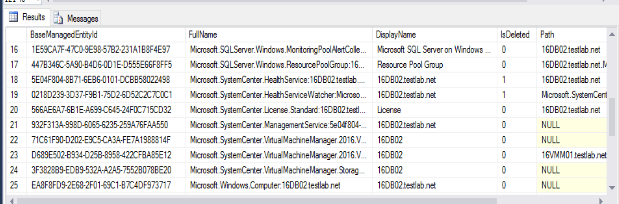
First, let’s test in the Lab.  Second, let’s talk about the express lane ‘easy button’.  Begin by deleting the Windows Computer orphaned object GUID.  Process the Windows Computer object (bottom), followed by the top two (2) are HealthService, and HealthServiceWatcher object properties (see three items highlighted).
16db02 properties
16db02 properties
Second piece, marking the Windows Computer GUID for deletion (IsDeleted=1) cleans up nearly ALL properties.  See the progress below, how this slight change makes short order of orphaned properties for ‘server’.
Windows Computer object marks all but SCVMM for deletion
Third HealthService & SCVMM objects require manual deletion per GUID.
Note first screenshot shows health service properties marked ‘IsDeleted’ = 1 after manually processing each GUID.
HealthService marked for deletion
Fourth, screenshot shows there the HealthServiceWatcher property is marked for deletion (IsDeleted=1)
HealthServiceWatcher marked for deletion
If you have SCVMM, you will need to repeat for each of the SCVMM properties to clear out the orphans in the DB.
Why – the issue:
Typically, when servers are reimaged, i.e. NOT deleted from SCOM, there are two+ healthservice, HealthServiceWatcher, Windows Computer properties created for each image of example server.   Additional properties may show duplicated for any class discoveries that are common to the old and new image.
NOTE: Deleting the current agent may clean up objects for that instance of the discovered server, but NOT the old server image.

SCOM MS TLS1.2 drivers

SCOM MS TLS1.2 drivers

Courtesy of Brook Hudson, who provided clarification for encrypting SCOM data –

Question – Can we update the OLE DB Driver from 18.6.5 to 18.6.7 and the ODBC driver from 17.10.3 to 17.10.5.1 without breaking anything?


This configuration applies to SCOM2016 forward –

MS OLE DB Driver 18.6.7: https://go.microsoft.com/fwlink/?linkid=2242656

ODBC Driver 17.10.5.1: https://go.microsoft.com/fwlink/?linkid=2249004


I did NOT have success with this for SCOM2019 and SCOM2022 –

If the SQL endpoint is secured with encryption, then the following drivers can be used.

MS OLE DB Driver 19.3.2: https://aka.ms/downloadmsoledbsql

ODBC Driver 18.3.2.1: https://aka.ms/downloadmsodbcsql

If you want to use these newer drivers then SQL encryption is required, more information about enabling SQL Encryption: Configure SQL Server Database Engine for encryption – SQL Server | Microsoft Learnhttps://learn.microsoft.com/en-us/sql/database-engine/configure-windows/configure-sql-server-encryption?view=sql-server-ver15


The SQL team noted that the newer versions are defaulting Encrypt to be Yes/Mandatory. That is why the new drivers were having an issue. Setting up a certificate in the SQL endpoint would have allowed the connection to work:

Enable encrypted connections – SQL Server | Microsoft Docs

Certificate Management (SQL Server Configuration Manager) – SQL Server | Microsoft Docs

OLE DB Driver 19.0 for SQL Server Released – Microsoft Tech Community

ODBC Driver 18.0 for SQL Server Released – Microsoft Tech Community


IMPORTANT:

Update: Hotfixes released for ODBC and OLE DB drivers for SQL Server – Microsoft Community Hub


ServiceNow Event integration

ServiceNow Event integration
Time to integrate your Monitoring tools to ITSM tool.  First, this blog post documents ‘ServiceNow Event integration’.  Second, let’s explain the common acronym in my experience is SNOW/SNow.  Third, some background – ServiceNow has been around for some time as an Information Technology Service Management (ITSM), and discovery tool.  As a SaaS solution, companies can purchase a subscription and integrate tools via RESTAPI to create/update/close events or incidents.
First, let’s begin to discuss SCOM notification methods.  SCOM2022 adds a new capability with Teams integration.  Second, most people are familiar with notification methods leveraging Email (html or not), perhaps SMS, but not so much command channel, calling some script in shell, PowerShell, etc.  Generally, the command channel is basically a post processing script capability to execute notifications.  Third, example tools where command channel might be used – BMC BEM (BMC Event Manager), BMC Remedy, xMatters, DerDack; SNOW integration within SCOM, using notification channels.  Lastly, SaaS solutions (vendors like xMatters, and ServiceNow) allow RESTAPI crafted requests to take actions.
SNOW prerequisites
1) ServiceNow User/Password (or API key)
2) SNOW RESTAPI PowerShell needs to securely access credentials
For the Incident PowerShell, we store Credentials within Windows Credential Manager
3) Network connectivity to SaaS provider (use PowerShell test-netconnection from SCOM MS to test connectivity over whatever port(s) vendor requires.
4) ServiceNow CallerID GUID
5) Production and Test URL’s (also required for network connectivity tests)
6) Access to SNOW UI to verify required fields and values for the script parameters.
Update incident script and begin testing.
Download script from GitHub repo https://github.com/theKevinJustin/New-SNowEvent/
Download script, and copy to monitoring repository
Copy to SCOM management servers (MS)
NOTE Path, to run from management server
Update script, with pre-reqs above –
Credential Manager stored ID
For more detail, look at parameter examples below to verify UI.
Update with customer/ServiceNow SNOW subscription specific values:
##CallerID##
##CUSTOMER##    (customize SNOW short_description)
##TEAM##    (customize SNOW short_description)$Channel = “Direct”
$ServiceNowURL=”https://##SERVICENOWURL##/api/now/table/em_event”
$CallerID = “##CallerID##”
# if proxy is used, uncomment and replace with Proxy URL
#$Proxy = “##Proxy##”
# Test New-SNOWEvent.ps1
# Depending on how you want to randomly choose an alert to create SNOW event
Lab example
$Alerts = get-scomalert -resolutionstate 0 | where { $_.Name -like “System Center*” }
Gather Critical, New alerts
$Alerts = get-scomalert -ResolutionState 0 -severity 2
Debug for warning alerts
$Alerts = get-scomalert -ResolutionState 0 -severity 1
# Debug
$Alerts[0] | fl ID,Name,Description,Severity,MonitoringObjectDisplayName
.\New-SNOWEvent.ps1 -AlertName $Alerts[0].Name -AlertID $Alerts[0].ID -Impact 4 -Urgency 4 -Priority 3 -AssignmentGroup “System Admin” -BusinessService “System Management” -Category Support -SubCategory Repair -Channel Direct
Example output
PS C:\Users\scomadmin\Desktop> .\New-SNOWIncident.ps1 -AlertName $Alert.Name -AlertID $Alert.ID -Impact 4 -Urgency 4 -Priority 3 -AssignmentGroup “System Admin” -BusinessService “System Management” -Category Support -SubCategory Repair -Channel Direct
TEST ServiceNow URL specified.
CredentialManager PoSH Module Installed, ModuleBase = C:\Program Files\WindowsPowerShell\Modules\CredentialManager\2.0
The System Center Management Health Service 5E04F804-8B71-6EB6-0101-DCBB58022498 running on host 16DB02.testlab.net and s
erving management group with id {E39F5F53-9FBB-9D7F-4BFE-5F0324630AE5} is not healthy. Some system rules failed to load.
16DB02
Warning
impact 4
urgency 4
priority 3
ServiceNow Credential NOT stored on server

ServiceNow Incident Integration

ServiceNow Incident Integration
Time to integrate your Monitoring tools to ITSM tool.  First, this blog post documents ‘ServiceNow Incident integration’.  Second, let’s explain the common acronym in my experience is SNOW/SNow.  Third, some background – ServiceNow has been around for some time as an Information Technology Service Management (ITSM), and discovery tool.  As a SaaS solution, companies can purchase a subscription and integrate tools via RESTAPI to create/update/close events or incidents.
First, let’s begin to discuss SCOM notification methods.  SCOM2022 adds a new capability with Teams integration.  Second, most people are familiar with notification methods leveraging Email (html or not), perhaps SMS, but not so much command channel, calling some script in shell, PowerShell, etc.  Generally, the command channel is basically a post processing script capability to execute notifications.  Third, example tools where command channel might be used – BMC BEM (BMC Event Manager), BMC Remedy, xMatters, DerDack; SNOW integration within SCOM, using notification channels.  Lastly, SaaS solutions (vendors like xMatters, and ServiceNow) allow RESTAPI crafted requests to take actions.
SNOW prerequisites
1) ServiceNow User/Password (or API key)
2) SNOW RESTAPI PowerShell needs to securely access credentials
For the Incident PowerShell, we store Credentials within Windows Credential Manager
3) Network connectivity to SaaS provider (use test-netconnection from SCOM MS to test connectivity over whatever port(s) vendor requires.
ServiceNow CallerID GUID
4) Production and Test URL’s (also required for network connectivity tests)
5) Access to SNOW UI to verify required fields and values for the script parameters.
Update incident script and begin testing.
Download script, and copy to monitoring repository
Copy to SCOM management servers (MS)
NOTE Path, to run from management server
Update script, with pre-reqs above –
Credential Manager stored ID
For more detail, look at parameter examples below to verify UI.
Update with customer/ServiceNow SNOW subscription specific values:
##Company##     (customize SNOW short_description)
##Team##     (customize SNOW short_description)$Channel = “Direct”
$ServiceNowURL=”https://##ServiceNowURL##/api/now/table/incident”
#$Proxy = “##CustomerProxyURL##”
$CallerID = “##GUID##”
# Test New-SNOWIncident.ps1
# Depending on how you want to randomly choose an incident
Lab example
$Alerts = get-scomalert -resolutionstate 0 | where { $_.Name -like “System Center*” }
Gather Critical, New alerts
$Alerts = get-scomalert -ResolutionState 0 -severity 2
Debug for warning alerts
$Alerts = get-scomalert -ResolutionState 0 -severity 1
# Debug
$Alerts[0] | fl ID,Name,Description,Severity,MonitoringObjectDisplayName
.\New-SNOWIncident.ps1 -AlertName $Alerts[0].Name -AlertID $Alerts[0].ID -Impact 4 -Urgency 4 -Priority 3 -AssignmentGroup “System Admin” -BusinessService “System Management” -Category Support -SubCategory Repair -Channel Direct
Example output
PS C:\Users\scomadmin\Desktop> .\New-SNOWIncident.ps1 -AlertName $Alert.Name -AlertID $Alert.ID -Impact 4 -Urgency 4 -Priority 3 -AssignmentGroup “System Admin” -BusinessService “System Management” -Category Support -SubCategory Repair -Channel Direct
TEST ServiceNow URL specified.
CredentialManager PoSH Module Installed, ModuleBase = C:\Program Files\WindowsPowerShell\Modules\CredentialManager\2.0
The System Center Management Health Service 5E04F804-8B71-6EB6-0101-DCBB58022498 running on host 16DB02.testlab.net and s
erving management group with id {E39F5F53-9FBB-9D7F-4BFE-5F0324630AE5} is not healthy. Some system rules failed to load.
16DB02
Warning
impact 4
urgency 4
priority 3
ServiceNow Credential NOT stored on server

SCOM maintenance schedules

SCOM maintenance schedules
Do your SCOM users need to know if a server is in scheduled maintenance?  This came about as Aris asked questions.
 First, let’s discuss specific maintenance mode and maintenance schedule scenarios users might ask.  Second, determining IF scheduled maintenance enabled, running, about to run.  Third, how does another user know when scheduled maintenance ends, allowing action and decision point to add/extend server maintenance.  Fourth, whenever scheduled maintenance entered by one user, is NOT automatically seen by other roles.  While product guidance states ‘maintenance schedules be added by someone in SCOM admin group’, self-service users still need visibility.  Lastly, can we figure out a way to answer these questions.  Given these points, users to be able to see server maintenance details.  Also, can solution adhere to best practice ‘no alerts during planned maintenance’.
From PowerShell on SCOM MS
Get-SCOMMaintenanceScheduleList
$ScheduleList = Get-SCOMMaintenanceScheduleList
$ScheduleList.ID
$ScheduleList.ScheduleID.Guid
foreach ( $ID in $ScheduleList.ScheduleID)
{
$Schedule = get-SCOMMaintenanceSchedule -ID $ID
# $Schedule.MonitoringObjects ;
(get-scomclassInstance -id $Schedule.MonitoringObjects.Guid).DisplayName
# Debug endtime
$Schedule | ft User,ActiveStartTime,ActiveEndDate,ScheduledEndTime
}
Example Output
SCOM Maintenance Schedule Output
Workflows:
Scheduled Maintenance report task
Maintenance mode report – what’s about to end maintenance mode.
Obviously, expect both workflows into the ‘Proactive NOSC DailyTasks’ pack.  GitHub repo  https://github.com/theKevinJustin/ProactiveNOSCDailyTasks

OMI vulnerabilities for SCOM/LogAnalytics

New OMI vulnerabilities for SCOM/LogAnalytics Agents

Thank you Aris for reaching out with questions on these new vulnerabilities!

New OMI vulnerabilities for SCOM/Log Analytics Agents posted. The vulnerabilities apply to OMI component on non-windows servers with SCOM2019, SCOM2022, or Log Analytics agents.  The vulnerabilities apply to non-windows server operating systems.  See hotfix details below to resolve.

OMI vulnerabilities for SCOM/LogAnalytics CVE details

CVE-2024-21134 https://msrc.microsoft.com/update-guide/en-US/advisory/CVE-2024-21334

The vulnerability exists due to a use-after-free error in the Open Management Infrastructure (OMI). A remote attacker can execute arbitrary code on the target system.


CVE-2024-21330 https://msrc.microsoft.com/update-guide/en-US/vulnerability/CVE-2024-21330

The vulnerability exists due to application does not properly impose security restrictions in the Open Management Infrastructure (OMI), which leads to security restrictions bypass and privilege escalation.


SCOM Download links

2019 https://www.microsoft.com/en-us/download/details.aspx?id=58208

2022 https://www.microsoft.com/en-in/download/details.aspx?id=104213


Update OMI on for SCOM/Log Analytics agents

Leverage Holman’s Monitoring UNIX quick start guide(s) if you need a ‘how to’ or refresher to update your SCOM management groups with the latest packs, and how to update the agent on non-windows/UNIX servers.

SCOM2022 https://kevinholman.com/2022/12/12/monitoring-unix-linux-with-scom-2022/

SCOM2016,2019 https://kevinholman.com/2016/11/11/monitoring-unix-linux-with-opsmgr-2016/

SQL SysMessages 18054 events


SCOM2016+ SQL SysMessages 18054 events

Whether you’re building a new SCOM2019, SCOM2022 environment or not, you might be missing these event details, and NOT even know!


It’s been a while for me, and I came across these, so posting for a fresh heads up!

Leverage Holman’s TXT files to keep your logging up to maximum potential!  Use the information below to resolve SCOM2016+ SQL SysMessages and 18054 events.

Holman GitHub download – contains SQL TXT files to run on OpsMgr & DW databases https://github.com/thekevinholman/SQLFix18054EventsSysmessages


The Github TXT files to download contain a clear scope of messages.


SQL messages excerpt

—————————————–
— MOMv3 messages are 77798xxxx —
—————————————–

———————————————–
— Discovery range: 77798-0000 to 77798-0049 —
———————————————–
— Managed type doesn’t exist.
EXECUTE sp_addmessage @msgnum = 777980000, @msgtext = N’The specified managed type doesn”t exist.’, @severity = 16, @lang = ‘us_english’, @with_log = false, @replace = ‘REPLACE’
GO

— Relationship type doesn’t exist.
EXECUTE sp_addmessage @msgnum = 777980001, @msgtext = N’The specified relationship type doesn”t exist.’, @severity = 16, @lang = ‘us_english’, @with_log = false, @replace = ‘REPLACE’
GO

— Source entity of the relationship doesn’t exist.
EXECUTE sp_addmessage @msgnum = 777980002, @msgtext = N’The specified relationship doesn”t have a valid source.’, @severity = 16, @lang = ‘us_english’, @with_log = false, @replace = ‘REPLACE’
GO

— Target entity of the relationship doesn’t exist.
EXECUTE sp_addmessage @msgnum = 777980003, @msgtext = N’The specified relationship doesn”t have a valid target.’, @severity = 16, @lang = ‘us_english’, @with_log = false, @replace = ‘REPLACE’
GO

— Discovery data from invalid managed entity is dropped.
EXECUTE sp_addmessage @msgnum = 777980004, @msgtext = N’Discovery data has been received from a rule targeted to a non-existent entity. The discovery data will be dropped.’, @severity = 16, @lang = ‘us_english’, @with_log = false, @replace = ‘REPLACE’
GO

— Invalid relationship rejected by cycle detection.
EXECUTE sp_addmessage @msgnum = 777980005, @msgtext = N’Relationship {%s} was rejected because it would cause a containment cycle; relationship source = ”%s” and target = ”%s”.’, @severity = 16, @lang = ‘us_english’, @with_log = false, @replace = ‘REPLACE’
GO

— Discovery data generated by invalid connector.
EXECUTE sp_addmessage @msgnum = 777980006, @msgtext = N’Discovery data generated by invalid connector:%s.’, @severity = 16, @lang = ‘us_english’, @with_log = false, @replace = ‘REPLACE’
GO

— Discovery data generated by invalid rule, task, discovery.
EXECUTE sp_addmessage @msgnum = 777980007, @msgtext = N’Discovery data generated by invalid discovery source. Id:%s.’, @severity = 16, @lang = ‘us_english’, @with_log = false, @replace = ‘REPLACE’
GO

Documentation links

Blog for 18054 events https://kevinholman.com/2017/08/27/scom-2016-event-18054-errors-in-the-sql-application-log/

SCOM 2016, 2019 and 2022: Event 18054 errors in the SQL application log

Alternatively, if AlwaysOn configuration, leverage Holman’s newer blog post – https://kevinholman.com/2022/10/02/scom-deployment-configuration-for-sql-always-on/

SCOM deployment configuration for SQL Always On


SQL STIG vulnerabilities V-213902, V-213935

Happy leap year, let’s talk Security and SQL STIG vulnerabilities V-213902, V-213935!
Happy Leap year
Happy Leap year

DISA DOD SQL STIG vulnerabilities V-213902, V-213935

SQL DBA team for RCC-C customer requesting documentation for exception, in light of vulnerabilities.
V-213902
V-213935
SCOM uses individual computer accounts in SQL for these findings
Holman documented this since 2012

SCOM SECURITY Documentation

SCOM2019 https://kevinholman.com/2020/07/23/scom-2019-security-account-matrix/

Both V-213902 AND V-213935 state same identification action.

Run this SQL Query on SCOM DB(s)
SELECT name
FROM sys.database_principals
WHERE type in (‘U’,’G’)
AND name LIKE ‘%$’
To remove users:
Run the following command for each user:
DROP USER [ IF EXISTS ] ;

V-213935 has a different identifier:

Launch PowerShell.
Execute the following code:
Note: <name> represents the username portion of the user. For example; if the user is “CONTOSO\user1$”, the username is “user1”.
([ADSISearcher]”(&(ObjectCategory=Computer)(Name=<name>))”).FindAll()
If no account information is returned, this is not a finding.
If account information is returned, this is a finding.

Tab delimited view –

Remove Computer Accounts DB SQL6-D0-000400 V-213902 CAT II Non-repudiation of actions taken is required in order to maintain data integrity. Examples of particular actions taken by individuals include creating information, sending a message, approving information (e.g., indicating concurrence or signing a contract), and receiving a message.
Remove Computer AccountsSQL6-D0-004200V-213935CAT IINon-repudiation of actions taken is required in order to maintain data integrity. Examples of particular actions taken by individuals include creating information, sending a message, approving information (e.g., indicating concurrence or signing a contract), and receiving a message.
Can provide one work-around to mitigate.
Awaiting CSS engagement for official mitigation from support and  SCOM PG.