Updated Skype for Business 2015 Addendum pack

Continuing work with Nick Wood on the Skype pack for additional operational features.

Previously Blogged about this July 2018, and continue to make improvements

The TechNet gallery bundle is updated with new functionality.

Skype KHI addendum

Pack gathers the Skype KHI performance counters

Packets * Discards performance rules where greater than 100 discards are seen on NIC’s,

Monitoring Tab folder/performance view

Skype Custom Overrides

Includes common overrides for noisy monitors/rules.

Install SCVMM management packs from VMM Server

Time for some automation

Ever have to upgrade SCVMM packs every time a new Update Release (UR) comes out?

Copy the files off from the VMM server to your SCOM MS, install.

How long does that take?

Try this script out – assuming you have a login on the VMM Server

TechNet Gallery post here

# Set up some variables

$UR=”UR5″

$VMMServer = “16VMM01”

# Set up your path, this example is monadmin\backup

$date = Get-Date -UFormat “%Y-%m-%d”

# Set up backup path

$backupPath = “C:\monadmin\backup”

$backupDrive = “C:”

# Create some functions

Watch them roll, let PowerShell do your work!

UR6 packs

SCOM management packs backed up

Check out the SCOM Console Admin tab for updates!

Troubleshooting Service Map pack


Updated 14 Mar 2019


If you get these exceptions like me, the issue has been raised, with a deliverable targeted for SCOM2019UR1.

Disable the rule to reduce noise.


Are you using Service Map Management pack, and getting errors?


This alert is based on the 46651/46652 event ID in the Operations Manager event log

From SCOM Console > Authoring Tab > Management Pack Objects > Rules

Search in ‘Look for:’ bar GenericException (yes no space in between)


Rule


Rule Details


To enable debug on the MS


For collecting logs, please do the following:

  • Create folders “c:\Debug\ext\”
  • Now, Wait for an hour(which is the default time interval set in the rule for running service map api).
  • You will see some log files created in that folder “ext”. Please share the same in email.


The file showed up after the alerts, and listed debug INFO and WARN lines, and the time stamps match up to the generic exception rules.


Stay tuned for more information, I have been trying to get more answers on the exception

{WARN} [12:35:20.966] [ScomUtils] failed to export XML for Management Pack: System.NullReferenceException: Object reference not set to an instance of an object.

   at ScomBridge.ScomUtils.WritePackXmlToFile(ManagementPack pack, String filename)


XML for Product or Company Knowledge

Digging in the archives…


From a discussion with some PFE’s – the question was ‘how do I create knowledge for a monitor/rule?’

Tyson Paul pointed out the system Center Wiki  ‘Knowledge Article authoring’  


When you create a knowledge article in an MP (let’s not even go into the console GUI! )

If the Knowledge Article references a sealed workflow (does it reference a sealed pack)

It’s Company Knowledge


Example

If the Knowledge Article references a sealed monitor, it will show up under the ‘Company Knowledge’ tab

XML example from Skype Addendum pack on TechNet Gallery

<KnowledgeArticles>
<KnowledgeArticle ElementID=”ML2MC!Microsoft.LS.2015.Monitoring.Internal.Health.DiscoveryRunner” Visible=”true”>
<MamlContent>
<maml:section xmlns:maml=”http://schemas.microsoft.com/maml/2004/10″>
<maml:title>Summary</maml:title>
<maml:para>Any added Skype servers will not be discovered in SCOM.</maml:para>
</maml:section>
<maml:section xmlns:maml=”http://schemas.microsoft.com/maml/2004/10″>
<maml:title>Causes</maml:title>
<maml:para>Discovery Failed.  An internal exception has occurred during discovery.</maml:para>
</maml:section>
<maml:section xmlns:maml=”http://schemas.microsoft.com/maml/2004/10″>
<maml:title>Resolutions</maml:title>
<maml:para>Fix permission issues in alert.</maml:para>
<maml:para>Skype PowerShell module may not be installed.</maml:para>
<maml:para>Import-Module SkypeForBusiness</maml:para>
</maml:section>
</MamlContent>
</KnowledgeArticle>

</KnowledgeArticles>


If the Knowledge Article is referenced in a sealed pack, OR an UNsealed pack has a rule/monitor in the same unsealed pack)

It’s Product Knowledge


Sealed pack example


Unsealed pack Example

Test fire any event on any server from any application

Golden Oldies – always popular (tools vs music)

Old Holman blog that’s still relevant, even more powerful than EventLog Explorer

Basically anyone who wants to test fire events off a SCOM MP should use this tool.

Event Create, write-eventlog all have limitations (certain event sources that can be used to create events, or event ID number limitations)

First, download the 2007 R2 Admin ResKit here

MomTeam blog reference

Double click the downloaded MSI

I prefer to move extracted files under my SCOM tools/Management pack directory structure under MonAdmin (Monitoring Admin)

Copy extracted files to gold depot

Move to gold depot – SCOM \ tools \ <toolname here>

Go into the MPEventAnalyzer directory

Run the exe

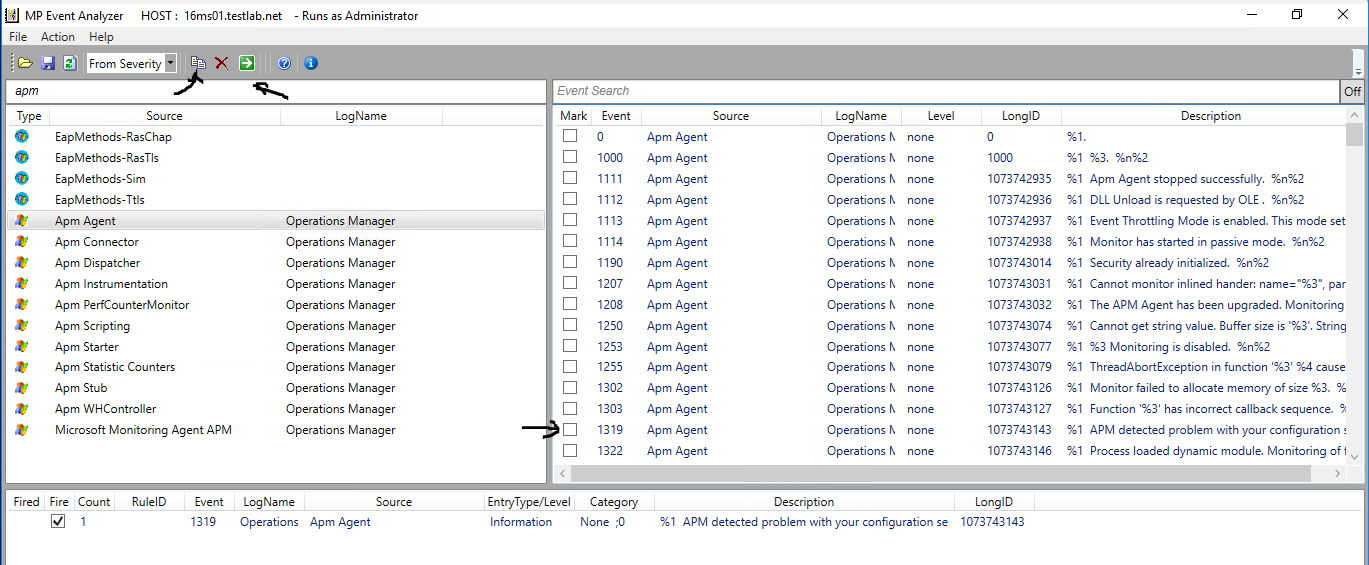
MP Event Analyzer

Click on Investigate Event Sources Tab (bottom middle)

Don’t forget you can use the search bar (where I typed apm)

For my example, double click on APM Agent

Search Events on right hand pane

Check checkbox to select the 1319 APM event for configuration error (right hand pane)

Click the ‘Add selected events to execution list’

Once event verified in bottom box, click the green box to fire selected event(s)

Verify event in Event Viewer

Validate Management Pack

Stay tuned… this did not complete the validation process.

Re-learn an old but still relevant tool – EventLog Explorer


Sometimes we forget about tools that can make things easier.


Time to talk about EventLog Explorer.


Need to repro and test events for an installed program, to see what SCOM will handle?

Read this old mom team blog, courtesy of Kevin Holman blog


I wanted to try it to test fire some events, had a use case where we needed to test Skype events from the SCOM MP


Testing on my SCOM 2016 Management server


Download file, run EventLog Explorer

The Paste icon next to the X is ‘Add to Execution List’ and fills out the bottom pane

The Green Arrow is ‘go’ or execute (similar to PowerShell ISE)


Navigate through the Event Log and Event Source on the left hand pane

Mark events with the checkbox  


Add to Execution


Verify events added to bottom pane

(see my test yesterday for fired, and not fired events from today)


Click Green box with white arrow to fire events, and check Event Viewer


Yesterday’s test


Today’s test


Verify alerting occurred as expected!

Updated Skype for Business 2015 (premise) Addendum MP

Updated and completed for Company Knowledge!


Many thanks to Nick Wood for his help deciphering user impact for these alerts.

Reach out to Nick on LinkedIn


This has been an arduous effort to complete the Skype alerts and components.


Gallery Download


It’s taken a few steps along the way, to get all the content delivered.


To read the whole Skype Addendum journey, please read these additional blog posts
June blog
January blog


The initial Addendum pack with just service recoveries and Azure overrides

Old pack https://gallery.technet.microsoft.com/Skype-for-Business-2015-b005f49f
This download disabled Azure, set service recovery tasks


The new Gallery download contains the following:

Skype SCOM Alerts.xls
Microsoft.LS.2015.Monitoring.ComponentAndUser.Addendum.xml
Microsoft.SystemCenter.Notifications.Internal.xml
Skype.for.Business.Server.Management.Pack.Alert.Grooming.xml


NOTE The Skype.for.Business.Server.Management.Pack.Install.txt file contains the information as well


#############################################################
#
# Breakdown of files
#
#############################################################

#
# Skype SCOM Alerts.xls
# Skype SCOM Alerts XLS is is MP Export excerpt formatted for XLS workbook
#
# Feel free to search this file

# Column D is ‘Escalate to Who’
# This has values as SCOM Engineering, Messaging Ops, Telephony, Messaging Engineering
# Column E is impact
# This has values: P3-P5, *Email
# Column F is the Display String for the monitor
# Column H has the User Impact, Cause, and Troubleshooting steps


#
# Microsoft.LS.2015.Monitoring.ComponentAndUser.Addendum.xml
# Addendum management pack sets up company knowledge tab for each Skype monitor, with actionable troubleshooting steps.
#


#
# Microsoft.SystemCenter.Notifications.Internal.xml
#

# Backup the current MP first, and merge if you are adding this to your environment!
# Use this pack cautiously, as it will replace existing Channels, subscribers, subscriptions.

# On Management server, open PowerShell window as Admin
#
# cd <path>
# Example

cd $HOME/desktop
Get-SCOMManagementPack -Name *Notification* | export-SCOMmanagementpack  -path “C:\”

Copy-item .\Microsoft.SystemCenter.Notifications.Internal.xml .\Original-<CompanyName>-Microsoft.SystemCenter.Notifications.Internal.xml


# Save the bundled Notifications pack to the same path

# YES it’s that important, the file can eliminate any alerts leaving SCOM!
#
# Save file to local drive

# Follow MP Fragment authoring if you need to merge existing Notifications with Skype pack
# https://kevinholman.com/2016/06/04/authoring-management-packs-the-fast-and-easy-way-using-visual-studio/
#

#
# Skype.for.Business.Server.Management.Pack.Alert.Grooming.xml
#
# This file is to set alerts per the XLS, making warnings for P4,P5, email, and P3 for Critical

#
#############################################################


Skype for Business 2015 (premise) Addendum MP

Ever try to figure out a Skype alert, for which server in the pool(s) is failing?


While maybe not the clearest to find root cause, the Skype pack brings a bunch of functionality, including synthetic transactions.


I was lucky enough to collaborate with Nick Wood, Skype PFE, to help provide more detail, troubleshooting, impact on what is critical versus warning.


What the addendum pack brings

Do you think 656 monitors can all be critical?

  • Sets up service restart recovery tasks for all Skype services
  • Company Knowledge tab for troubleshooting/user impact


Gallery Download


Here is a visual of our Skype efforts for integrating troubleshooting details into SCOM console.

NOTE:  Company Knowledge tab would be accessible from the alert as well


Company Knowledge

SCOM Console, Authoring tab, Dispatcher Queue monitor

Highlight monitor, right click, choose properties

Click on ‘Company Knowledge’ tab

Incorporated the XLS into SCOM under Company Knowledge for additional information on user impact, causes, and troubleshooting (under resolutions)


Lync 2013 Addendum Management Pack

Continuing the Addendum tradition 🙂 Lync couldn’t be forgotten.


To understand options and methods available on the Server and SCOM, re-read the Active Directory Addendum blog


Lync 2013

Now that we understand the methods available, let’s get to the Addendum.


The Addendum pack has 32 Recovery Tasks for Lync Service Monitors.


The recoveries cover the following services:

Access Edge, CMS Master, File Transfer Agent, Lync Backup Service, Push Notification Service, Replica Replicator Agent, Online Telephony Conferencing, Audio Video Conferencing, BI Data Collector, Conferencing Attendant, Conferencing Announcement, Application Sharing, Persistent Chat, Persistenc Chat Compliance, Centralized Logging Service Agent, Call Park, Web Conferencing, Web Conferencing Edge, IM Conferencing, Legal Intercept Service, Log Retention Service, Audio Video Edge, Mediation, Audio Video Authentication, Bandwidth Policy Service Authentication, Bandwidth Policy Service Core, Server Response Group, Front End Service, World Wide Web Publishing, XMPP Translating Gateway, XMPP Translating Gateway Proxy.

The recovery tasks verify service state, start ‘not running’ services, and include the option to recalculate health.


My goal is automation that helps anyone work smarter versus harder, with the goal to avoid being woke up at 2am just to restart a service.


Gallery Download          https://gallery.technet.microsoft.com/Lync-2013-Addendum-2a92aa00

Skype for Business 2015 (SfB) Addendum Management Pack


Continuing the Addendum tradition 🙂 Skype was next on the list.


To understand options and methods available on the Server and SCOM, re-read the Active Directory Addendum blog


Skype for Business 2015 (SfB)

Now that we understand the methods available, let’s get to the Addendum.

This Skype Addendum MP adds Recovery Tasks to the Skype for Business 2015 Service Monitors.

The recovery tasks verify service state, start ‘not running’ services, and recalculate health.

36 services monitored, with 36 recovery tasks.

The recovery tasks verify service state, start ‘not running’ services, and include the option to recalculate health.


My goal is automation that helps anyone work smarter versus harder, with the goal to avoid being woke up at 2am just to restart a service.


Gallery Download      https://gallery.technet.microsoft.com/Skype-for-Business-2015-b005f49f